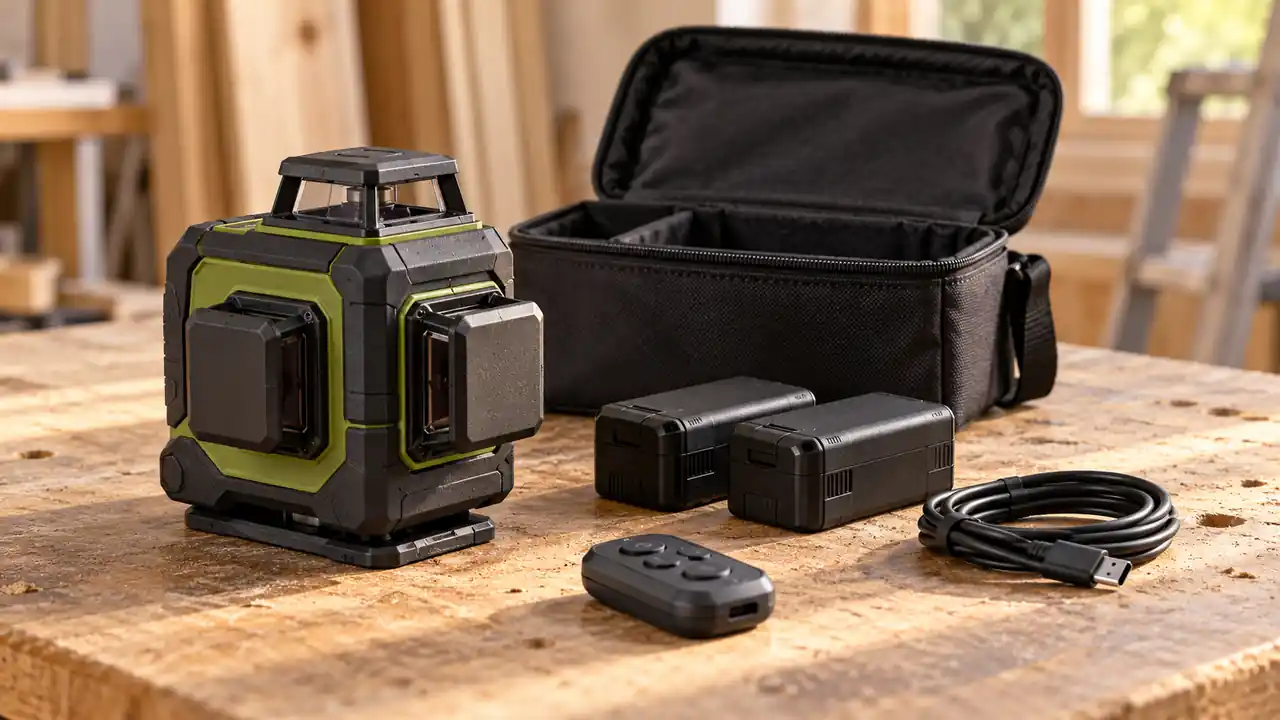
Three green planes can give two lasers the same headline capability while leaving you with a different working day. The CIGMAN CM-701 vs CM-801 decision is mainly about power continuity and the accessories around the laser. Both offer one horizontal and two vertical 360-degree planes; the CM-801’s two removable batteries give it a clearer role when you want a ready spare.
For occasional room projects, the CM-701 is a straightforward three-plane option. For repeated sessions where stopping to recharge would interrupt the layout, the CM-801’s battery-swapping arrangement is the more useful distinction. Do not expect the higher model number alone to deliver a different layout geometry or automatically sharper accuracy.
CM-701: a complete room-layout starting point

The CM-701 combines rechargeable operation with a remote and magnetic mounting arrangement. It suits a room where you want to keep a horizontal datum while switching vertical references as the task changes. For a shelving wall followed by a cabinet run, that geometry can be much more convenient than moving a short cross-line reference each time you turn toward another wall.
Its attraction is a manageable setup with the useful layout functions already present. You still need to arrange a dependable support and a charging routine, but you do not need a different projection pattern merely because the project spans more than one wall.
To buy this product, click here.
CM-801: a clearer plan for a mid-job battery change

The CM-801 package adds two removable rechargeable batteries, allowing one to serve as a spare. That matters most when the instrument stays in service through a longer layout or moves between several working areas. You can prepare the second pack before the job rather than relying entirely on a charging opportunity at the right moment.
The removable arrangement also makes power preparation easier to divide from instrument placement. It does not mean a battery change is guaranteed to preserve the reference. Handle the tool carefully, let it settle again, and check the datum before resuming marks.
To buy this product, click here.
CIGMAN CM-701 vs CM-801: Power and Layout Differences
| Factor | CM-701 | CM-801 | Practical effect |
|---|---|---|---|
| Plane arrangement | 1 horizontal + 2 vertical 360° planes | 1 horizontal + 2 vertical 360° planes | No additional layout plane from the higher number |
| Power configuration | Rechargeable lithium battery | Two removable rechargeable batteries in package | CM-801 provides a ready-spare approach |
| Remote control | Included | Included | Remote light control is common ground |
| Published level accuracy | ±1.5 mm at 5 m | ±1.5 mm at 5 m | No tighter quoted rating here |
| Published line working distance | 30 m | 30 m | No basic rated-distance win |
| Protection rating | IP54 | IP54 | Handle either as a precision instrument |
The CM-701 configuration and CM-801 configuration share the core three-plane layout. Treat the battery arrangement and supplied accessories as the meaningful comparison, rather than awarding the CM-801 every category because its number is larger.
A spare battery is valuable when interruption is the real problem
Imagine establishing a reference in one room, then continuing into a second area after a break. A ready spare gives you another way to keep the instrument available when the first pack runs down. That is a practical advantage if the work is scheduled around other trades or you cannot count on leaving the tool charging at an outlet.
On a short evening project, the same feature may sit unused. If the laser is charged before you begin and the layout is brief, a second removable pack is not necessarily what determines success. Clear reference placement, stable support, and a consistent marking method can matter more. The CM-701 remains relevant precisely because many home projects fit that pattern.
Do not compare the battery labels by milliamp-hours alone. Battery energy also depends on voltage, and a pack with a larger printed capacity is not automatically the longer-running system. Brightness, active planes, temperature, and battery condition all affect the actual session. A spare-pack strategy is easier to reason about than a sweeping claim that one battery number wins every situation.
The swap itself deserves a small plan. Preserve a known reference mark before handling the instrument, avoid pulling on the bracket, and confirm that the line returns where expected afterward. A few seconds of checking is preferable to carrying a shifted datum through the next row of fixings.
Both give you three planes, not a complete automatic layout
The horizontal plane can continue around the room, while the vertical planes offer references in two perpendicular directions. That is useful when a run turns a corner or you want to relate marks on adjacent walls. The instrument provides the references; you still decide how they align with the intended layout.
For example, a green line passing across a wall does not tell you whether that wall is straight. A vertical plane can help reveal how a surface sits relative to your chosen reference, but it cannot flatten an uneven cabinet side or decide where the finished face should be. Establish the working datum from the project, then use the laser to transfer it.
Nor should three 360-degree planes be read as every possible floor-and-ceiling reference. Each instrument’s physical window position determines where its planes can pass. A low mark can be blocked by a threshold, and a high reference may require a suitable support. When placement is awkward, the bracket and room geometry become the deciding accessories.
The remote helps with selection, not every adjustment
Both packages offer remote control for relevant light settings. That is handy when you are at the far wall and need a different active plane or brightness level. Turning off unused planes can also make it easier to see which reference you intend to mark against, especially where several surfaces intersect.
A remote does not establish that the instrument can physically rotate itself. If the reference misses a far target, you still need the appropriate manual positioning adjustment unless a specific motorized accessory is part of the system. Avoid treating remote line switching as automatic aiming, tracking, or calibration.
There is also no reason to run every plane at the brightest available setting for every task. Use the reference you need and verify that it remains readable at the mark. A bright, busy pattern across glossy surfaces may be less useful than one well-positioned line. Take particular care where reflections could be mistaken for the intended reference.
Mounting accessories can matter more than the model number
| Accessory or arrangement | CM-701 package | CM-801 package |
|---|---|---|
| Magnetic support | Magnetic L base | Magnetic L-shaped bracket |
| Compact positioning accessory | Mini tripod base listed | Not listed in the standard package |
| Remote | Included | Included |
| Rechargeable battery arrangement | Rechargeable tool configuration | Two removable packs |
| Charging cord | USB-C | USB-C |
| Carrying arrangement | Portable bag | Portable bag |
The CM-701 package lists a mini tripod base as well as the magnetic base, while the CM-801 package emphasizes the L-shaped bracket and spare-battery arrangement. A compact base can be useful for a low, stable setup, but it is not a full-height construction tripod. Decide where the horizontal datum needs to sit before deciding which supplied accessory is most useful.
Likewise, a strong magnetic attachment requires a suitable stationary surface. A steel item that can flex or be bumped is a poor foundation for repeated marks. If you will work around drywall, masonry, or cabinetry with no appropriate magnetic surface, plan a compatible separate support. Our laser-level mounting guide explains the placement choices that keep a reference usable.
Do not choose either on an unsupported outdoor claim
A bright green projection and a flashing mode are not enough to establish a complete outdoor detection system. Before buying a receiver, confirm explicit compatibility for the exact model and revision. A receiver’s ability to see a laser signal is a separate question from whether your eye can spot a pulsing line.
For long-distance outdoor elevation transfer, a rotary instrument and the correct rod-mounted receiver may fit the job better. For these CIGMAN models, keep the primary decision focused on the room-layout work they can support. If you are still deciding whether a three-plane tool is necessary, the wider home-use laser-level guide provides useful context.
Which setup suits your next project?
| Project pattern | Stronger fit | What decides it |
|---|---|---|
| Occasional room project, charged beforehand | CM-701 | Core geometry already covers the task |
| Consecutive sessions and spare-pack preparation | CM-801 | Two removable batteries create an alternative to waiting |
| Frequent low support positions | Compare the supplied bases | Usable placement matters more than the name |
| Automatic remote re-aiming | Reassess the system | Remote light controls do not establish motorized rotation |
| Outdoor grade checking as the main job | Consider a rotary setup | Receiver workflow should lead that choice |
The battery strategy should follow the working pattern. A spare pack is helpful when you have a reason to keep the laser available, but it cannot compensate for an unsuitable support or the wrong type of instrument. Start with the task, then choose the configuration that removes a real interruption.
The more useful upgrade is the one your workflow needs
The CM-801 earns its place when a ready removable spare makes the day easier. That could mean consecutive room layouts, limited outlet access, or a preference for preparing batteries separately from the instrument. Keep the spare ready, preserve the datum during changes, and its power arrangement becomes a practical working advantage rather than an unused extra.
To buy this product, click here.
The CM-701 remains a sensible three-plane choice for shorter, planned sessions. If charging before the project fits your routine, its layout pattern and remote functions already address a wide range of interior reference work. Pay attention to the mounting accessories you will actually use, and avoid changing models just to collect a second set of nearly identical green lines.
To buy this product, click here.
