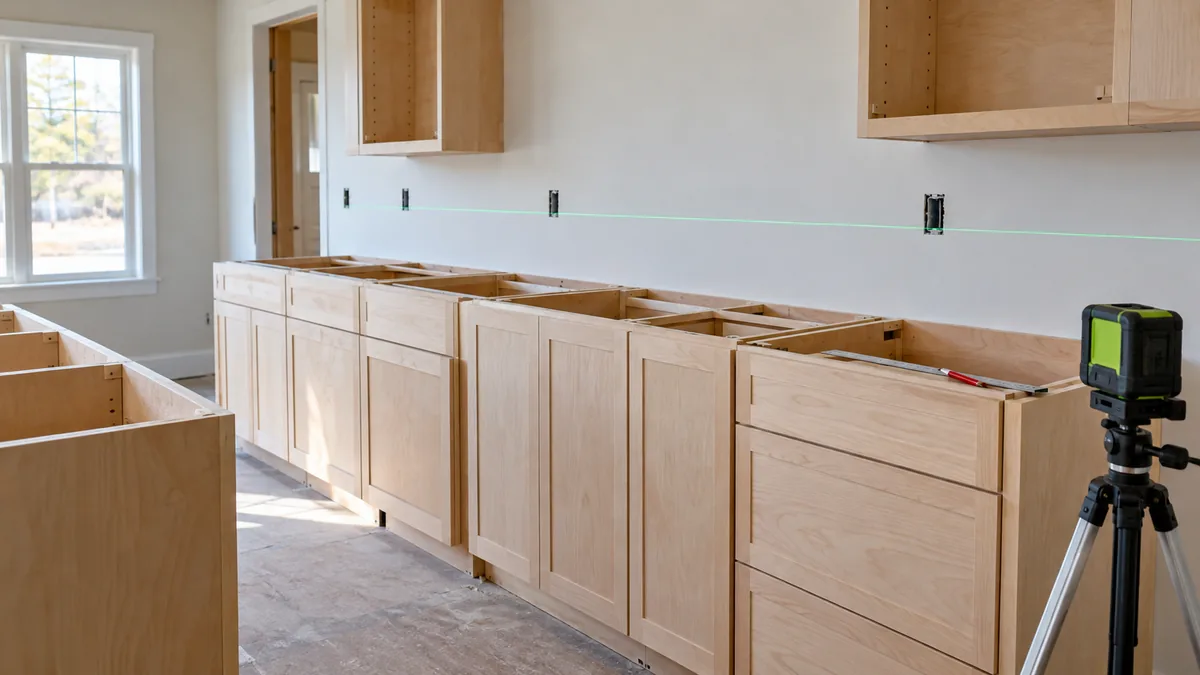
Understanding how to use a laser level for cabinets begins with the layout datum and the floor or finished-surface conditions that control the installation. Relate the cabinet positions to that datum, then transfer the actual rail or fixing dimensions specified for the cabinet system. The laser carries a reference; it does not decide the cabinet height or correct the room.
A kitchen can have a floor high point in one location, a ceiling that changes height, and a wall that bows behind the cabinet run. Those are different conditions. Trying to solve all three by following one convenient line usually makes the layout harder to understand.
When comparing equipment, the laser levels for cabinet installation guide concentrates on coverage, positioning, and supplied components. A compact cross can suit a contained run, while connected references around several walls may justify a continuous plane.
How to Use a Laser Level for Cabinets: Establish the Datum
Read the cabinet and mounting-system instructions before choosing a line height. Confirm the planned finished floor, the actual cabinet dimensions, worktop arrangement, rail or bracket offsets, and any installation clearances. Do not apply a familiar cabinet dimension to a different system simply because the boxes look similar.
Identify the relevant high point along the base-cabinet footprint using an appropriate checking method. A level laser plane can help compare distances down to the floor: where the distance from the same plane is smaller, the floor is higher. That comparison assumes the instrument has stayed at the same height and the measurements are being taken consistently.
The high point is a layout constraint, not proof that the rest of the floor is flat. Use the cabinet manufacturer’s installation method to determine the final support, adjustment, and fixing arrangement. KraftMaid’s cabinet installation resources, for example, are organized around the cabinet installation and its hardware, rather than a universal laser-line height.
Keep a Small Datum Record
| Record | What it means | Why it helps |
|---|---|---|
| Preserved wall datum | The identified reference to which the setup can return | It survives a moved or disturbed instrument |
| Finished floor basis | The surface condition used for the layout | It avoids mixing unfinished and finished floor measurements |
| Cabinet target position | The intended location of the relevant cabinet edge | It separates the visual result from the equipment position |
| Mounting offset | The rail or hole relationship supplied by the system | It locates actual fixings rather than a convenient visible edge |
You do not need an elaborate survey sheet for one kitchen run. A few clearly labeled marks and dimensions are enough if another person, or you after lunch, can tell what they mean. An unlabeled line called “cabinet height” can be interpreted several different ways.
Transfer the Cabinet Layout in a Controlled Order
- Confirm the planned installation. Check the cabinet schedule, actual parts, finished-floor assumptions, and mounting instructions.
- Preserve a datum outside the immediate fixing area. Put it somewhere unlikely to disappear behind a rail or be rubbed out during handling.
- Secure the laser and establish the required reference. Keep the support clear of cabinet movement and use the appropriate operating mode.
- Relate the cabinet positions to the datum. Record any offset between the laser plane and the intended finished edges.
- Mark the mounting system. Transfer the exact rail or hardware dimensions and confirm suitable structural fixing locations.
- Check the connected run. Revisit corners, openings, appliance spaces, and the relationship between base and wall cabinets before installation progresses.
- Recheck after securing the cabinets. Confirm the manufacturer’s required level, plumb, alignment, and adjustment conditions.
The instrument can stay at a convenient offset rather than shining through the final cabinet top. What matters is that the offset is understood and retained. If a cabinet or installer hides the beam, preserve the datum before moving the tool and reconnect the new setup to it.
Allow for Fixing Offsets and Wall Conditions
A suspension rail may sit below the top of a cabinet. A bracket hole may be offset from the finished shelf surface. A mounting plate can have slots that permit adjustment after the initial marks are made. Read the relevant dimensions instead of treating the beam as an instruction to drill directly through it.
The same relationship is explained in allowing for fixture-to-fixing offsets. It is particularly useful when a cabinet, open shelf, and decorative fitting must appear aligned even though their fixing patterns differ.
Check wall conditions independently. A projected reference can help reveal changes in distance along a surface, but it does not establish that a cabinet will sit correctly without the manufacturer’s required packing, support, or adjustment. Do not pull a cabinet into a distorted wall merely to make a visible gap disappear.
Carry the Datum Into Adjacent Tile Work
A backsplash is related to the cabinet and worktop layout, but it has its own joint, pattern, and perimeter requirements. Establish where the tile layout should begin and how it should finish around openings. A horizontal laser reference does not remove the need to account for actual tile sizes, joints, and cuts.
The laser levels for tile layouts comparison helps when the question is which reference geometry fits that marking task. Wall courses, floor patterns, and right-angle layout tools are not automatically the same arrangement.
Flooring: Use a Reference Without Confusing It With Flatness
Floor installation can require a planned starting direction, balanced cuts, or alignment with adjoining spaces. Those layout decisions differ from checking whether the substrate meets the flooring system’s flatness and moisture requirements.
These laser levels for flooring projects compare the available reference arrangements. Follow the flooring manufacturer’s preparation and installation requirements separately. A continuous line does not prove a floor is ready to receive the material.
Trim and Woodwork Need Their Own Finished Relationships
A chair rail can continue at a shared level around a room while its distance above an uneven floor changes. Crown or other trim may need a planned visual relationship to surrounding construction. Decide which condition controls the finished result before repeating a measurement from the floor or ceiling.
Use the laser levels for trim installation guide to compare the references and positioning options for those tasks. The choice should reflect the surfaces being related, not an assumption that more planes improve every joint.
For built-ins and other assemblies, laser levels for woodworking layouts can help compare ways to relate work to a room datum. The laser does not replace the square, straightedge, measuring method, or assembly checks appropriate to the woodworking operation.
Resolve Rough-In Positions Before They Disappear
Cabinet openings and finished fixtures can depend on services or framing that will later be concealed. Confirm the approved positions with the relevant plans and trades before cabinets cover access or make correction difficult.
For the reference-transfer side of that coordination, see carrying the datum into framing and rough-in marks. Keep the laser task limited to positioning information; structural, electrical, and plumbing requirements need their own applicable instructions.
Before calling the layout complete, revisit the preserved datum, the cabinet system’s dimensions, and the actual installed alignment. Agreement between those three is more useful than a line that merely looks straight across an empty wall.
